
How to Fix Garbled Display on a Cigarette Lighter TPMS Monitor
When your cigarette lighter TPMS (Tire Pressure Monitoring System) display shows garbled characters, scrambled symbols, or unreadable text, it indicates a communication or display error between the monitor and its data source. This is typically a solvable issue related to power, interference, or the unit itself. The solution involves a systematic troubleshooting approach, starting with the simplest fixes.
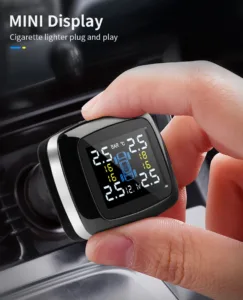
1. Understanding “Garbled Display” on a TPMS Monitor
A garbled display means the screen is not rendering text and numbers correctly. This is distinct from showing no signal, incorrect pressure readings, or a blank screen. It points to a problem in data processing or rendering within the display unit, often stemming from:
- Corrupted data transmission from the sensors to the display.
- Electrical noise or interference on the power or signal lines.
- Internal software glitch within the display unit.
- Failing hardware components (less common but possible).
2. Most Common Causes of a Garbled TPMS Display
| Category | Specific Cause | Why It Happens |
|---|---|---|
| Power Supply Issues | • Unstable voltage from the cigarette lighter socket. • Loose or poor connection of the 12V plug. • Blown fuse for the accessory circuit. | The display unit requires clean, stable 12V DC power. Voltage spikes, drops, or noise from the vehicle’s electrical system can corrupt its internal processing, leading to display errors. |
| Electromagnetic Interference (EMI) | • Other devices plugged into nearby 12V sockets or USB ports. • Aftermarket electronics (radar detectors, dash cams, chargers). • Proximity to strong radio sources. | TPMS sensors and the display communicate via radio frequency (RF). Other electronic devices can emit RF noise that interferes with this signal, causing data corruption that appears as garbled characters on the display. |
| Display Unit Software/Firmware Glitch | • Temporary software hang or memory corruption. • Incompatible sensor pairing (if sensors were recently replaced). | Like any digital device, the monitor’s microcontroller can experience a soft error. This is often temporary and fixed by a reset. |
| Faulty Display Unit Hardware | • Damaged LCD screen or connecting ribbon cable. • Failed internal processor or memory chip. • Physical damage from heat or impact. | Although less common, prolonged exposure to extreme heat (like direct summer sun) or physical shock can damage the unit’s internal components, leading to permanent display corruption. |
| Sensor Signal Problems | • Extremely weak or intermittent sensor signals. • Sensor battery is critically low. | If the data packets received from the tire sensors are incomplete or corrupted, the display may attempt to decode them incorrectly, resulting in garbled output. |
3. Step-by-Step Troubleshooting & Fix Guide
Follow these steps in order, from simplest to most complex.
Step 1: Basic Power Cycle & Connection Check
- Unplug and Replug: Remove the TPMS display from the cigarette lighter socket. Wait 30 seconds, then firmly plug it back in. This simple reboot can clear temporary glitches.
- Check the Socket: Try plugging the display into a different 12V accessory socket in your vehicle (if available) to rule out a problem with the first socket.
- Inspect the Plug and Cord: Look for any obvious damage, fraying, or bent pins on the 12V plug and power cord.
- Ensure Vehicle Power is On: Start the vehicle’s engine. A weak battery or accessory-only power mode might not provide stable voltage.
Step 2: Eliminate Electrical Interference
- Unplug All Other Devices: Remove any other electronics plugged into 12V sockets, USB chargers, or lighter port splitters. This includes dash cams, phone chargers, GPS units, and air fresheners.
- Test in Isolation: With only the TPMS display plugged in, drive for a few minutes. If the display returns to normal, one of the removed devices was causing interference. Re-add them one by one to identify the culprit.
- Relocate the Display: If possible, use a short extension cord to move the display unit away from other electronics, especially large LCD screens or power inverters.
Step 3: Perform a Full System Reset
If the display remains garbled, perform a hard reset to clear its memory.
- Unplug the display from the power source.
- If your model has a removable battery (for memory backup), remove it. If not, proceed to the next step.
- Press and hold the power button (if any) on the display for 15-20 seconds to discharge any residual power.
- Wait 2-3 minutes.
- Reconnect the power (and battery, if applicable). The unit should perform a fresh boot-up. Consult your user manual for a specific factory reset procedure, which may involve holding specific buttons during power-up.
Step 4: Check Vehicle Fuse and Power Stability
- Inspect the Fuse: Locate your vehicle’s fuse box (consult the owner’s manual). Find the fuse for the “Accessory Socket” or “Cigarette Lighter.” Use the fuse puller tool to remove it and check if the metal filament inside is intact. Replace it with a fuse of the identical amperage rating if blown.
- Test Socket Voltage (Advanced): Use a multimeter to check the voltage at the cigarette lighter socket with the engine running. It should read between 13.5V and 14.5V. A reading below 12V or wildly fluctuating indicates an alternator or battery problem affecting the display.
Step 5: Sensor Re-Learn/Pairing Process
If the display boots up but shows garbled data or incorrect readings, the communication protocol with the sensors may be corrupted.
- Refer to your TPMS kit’s manual for the specific “Sensor Pairing” or “Relearn” procedure.
- This often involves pressing a button on the display to enter pairing mode and then driving the vehicle above 15-20 mph for 10-15 minutes to allow it to re-acquire all sensor signals.
- If you recently replaced a tire sensor, ensure the new sensor is fully compatible with your display unit. An incompatible sensor can cause communication errors.
Step 6: Test in Another Vehicle
This is a definitive test to isolate the problem.
- Plug your TPMS display into a different vehicle’s 12V socket. If it works normally, the problem lies in your original vehicle’s electrical system or interference environment.
- If it remains garbled in a different vehicle, the fault is with the TPMS display unit itself.
4. When to Seek Professional Help or Replace the Unit
If all troubleshooting steps fail, the issue is likely internal to the display unit.
- Contact Manufacturer Support: Before discarding the unit, contact the manufacturer’s customer service. They may have advanced reset procedures or firmware updates.
- Professional Diagnosis: An automotive electronics specialist can diagnose if the issue is with the vehicle’s wiring or the unit.
- Consider Replacement: If the display unit is physically damaged, old, or out of warranty, replacement is often the most cost-effective solution. Ensure new sensors are compatible if you buy a complete new kit.
5. Preventive Measures to Avoid Future Issues
- Clean Power: Use a high-quality, dedicated 12V socket. Avoid cheap multi-port adapters that can introduce noise.
- Minimize Plugged-in Devices: Run only essential devices alongside your TPMS display to reduce interference risk.
- Proper Storage: In extreme heat, consider unplugging the display or using a sunshade to protect it from direct sunlight and high temperatures.
- Regular Checks: Periodically ensure the plug connection is secure and the display is functioning correctly.
Summary: A garbled cigarette lighter TPMS display is most commonly caused by power instability or electromagnetic interference. The fix typically involves power cycling the unit, removing other electronic devices, and performing a hard reset. If these steps fail, check the vehicle’s fuse and test the unit in another car. Persistent garbling usually indicates a faulty display unit requiring manufacturer support or replacement. By systematically eliminating these common causes, you can restore clear and accurate tire pressure monitoring.