Key Considerations for Replacing Tires and TPMS Sensors: Including Third-Party/Non-Integrated Systems
When replacing both the tire and the TPMS sensor, the core requirements—protecting the new hardware and ensuring proper electronic registration—apply universally. However, the process for a non-integrated, third-party TPMS system (a standalone kit with its own display) differs significantly from a vehicle’s integrated factory system in the areas of sensor compatibility, pairing method, and configuration tools. The primary distinction is that the new sensor must be paired with the system’s independent display unit, not the vehicle’s on-board computer.
1. Core Process Comparison: Factory vs. Third-Party TPMS
The fundamental difference lies in what computer system the new sensor communicates with.
| Aspect | Factory/Integrated TPMS | |
|---|---|---|
| System Core | Vehicle’s Body Control Module (BCM) or dedicated TPMS module. Information displays on the instrument cluster. | Standalone display unit (e.g., cigarette lighter plug-in, solar-powered dash unit). Has its own receiver and processor. |
| Sensor Compatibility | Must match the vehicle manufacturer’s specific protocol (e.g., Ford, Toyota, GM). Requires precise OEM or OEM-programmable sensors. | Must be compatible with the specific brand and model of the third-party kit. Sensors are usually only compatible with the same brand’s display. |
| Pairing/Registration Target | The vehicle’s computer (via OBD-II, trigger tool, or drive cycle). | The third-party display unit itself. This is done via the display’s buttons and menu, often without needing OBD-II access. |
| Configuration Tool | Often requires a professional OBD2 scanner or TPMS activation tool. | Typically configured using only the buttons on the display unit. Some kits include a simple magnet or activation tool. |
2. Special Considerations for Third-Party TPMS Sensor & Tire Replacement
When servicing a standalone system, follow this adapted procedure.
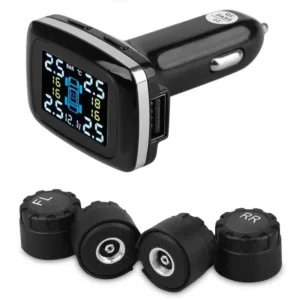
- Sensor Procurement (Critical First Step):
- You must purchase a replacement sensor specifically designed for your exact TPMS kit model. A “universal” automotive sensor will not work. Refer to the kit’s manual or contact the manufacturer for the correct part number.
- Many third-party systems use sensors that are pre-paired to the display from the factory. In this case, you simply install the new sensor, and it automatically connects. Verify this feature in your manual.
- Physical Installation (Identical to Factory):
- The physical installation precautions remain the same: use a complete service kit, inform the tire technician, and torque the sensor nut properly to avoid damage during tire mounting.
- Electronic Pairing with the Display:
- This is the key divergent step. Consult your display unit’s manual. Common methods include:
- Automatic Re-pairing: For many kits, after installing the new sensor and inflating the tire, driving the vehicle for 10-15 minutes will cause the display to automatically recognize and pair with the new sensor.
- Manual Button Sequence: Enter a pairing mode on the display (e.g., hold SET for 5 seconds), then typically deflate the tire slightly or use a magnet on the valve stem to trigger the sensor. The display will beep to confirm.
- Menu-Driven Setup: Navigate the display’s menu to a “Sensor Pairing” or “Relearn” option and follow the on-screen prompts.
- This is the key divergent step. Consult your display unit’s manual. Common methods include:
- Post-Installation Verification:
- Verify the pressure reading for the replaced tire appears correctly on the third-party display.
- Crucial: The vehicle’s factory TPMS warning light (if equipped) will likely remain on because the vehicle’s computer does not recognize the new third-party sensor. This is normal. The standalone system operates independently. You are monitoring pressure via the add-on display.
3. Advantages and Challenges of Third-Party Systems During Replacement
- Advantages:
- Simpler Relearn Process: Often does not require expensive diagnostic tools.
- Easier Sensor Sourcing: Sensors are usually purchased directly from the kit manufacturer or retailer, simplifying compatibility checks.
- Independent Operation: Failure or replacement of a sensor does not affect the vehicle’s own diagnostic systems.
- Challenges & Pitfalls:
- Proprietary Compatibility: Sensors are often locked to a specific brand/model of display. You cannot mix and match.
- Display Unit is Central: If the display unit fails, you may need to replace the entire kit, even if sensors are good.
- Double Warning Lights: Drivers must understand that two independent systems (factory light and third-party display) may provide alerts, which can be confusing.
4. Universal Best Practices (Apply to All Systems)
Regardless of the system type, these steps are non-negotiable for a successful tire and sensor replacement.
- Always use a complete TPMS service kit (new sensor, valve stem, seal, nut, core).
- Ensure the tire technician is aware of the TPMS sensor to prevent damage during mounting.
- Torque the sensor nut and wheel lug nuts to the specified values with a proper torque wrench.
- Perform a dynamic wheel balance after remounting the tire. The new sensor assembly changes the wheel’s weight distribution.
- Perform the required electronic pairing/relearn procedure immediately after installation. Do not assume it will “figure itself out.”
Conclusion: Replacing a sensor in a non-integrated, third-party TPMS system follows the same mechanical care as a factory system but simplifies the electronic integration. The critical task is pairing the new sensor to the standalone display unit via its own user manual instructions, rather than programming it into the vehicle’s computer. Success hinges on purchasing a sensor compatible with your specific kit model and carefully following the display’s pairing procedure. This ensures your independent monitoring system continues to provide accurate, real-time tire pressure data.