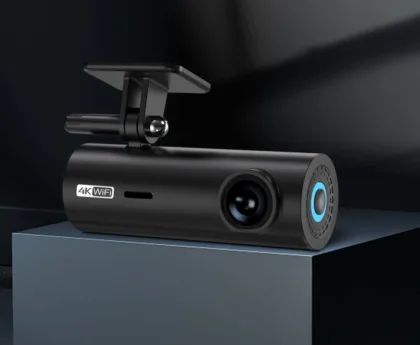
[Panoramic Dash Cam] Installation Method of Panoramic Dash Cam and Its Functions
Installation Method for a 360-Degree Dash Cam
First, understand the components of the 360-degree dash cam and the overall installation diagram (refer to the manual), then proceed step by step.
I. Camera Installation
- The front camera of the dash cam is installed on a suitable grille or the car emblem on the front grille.
- The left and right side cameras are installed at the bottom of the side mirrors. Universal models require drilling holes, while dedicated models directly replace the original mirror base.
- The rear camera is installed at the position of the rear license plate light or the trunk handle.When securing the side cameras, pay attention to the marking point on the camera. Its direction should be perpendicular to the car body and facing outward. This ensures the car body appears roughly horizontal in the side-view image.
- Important Points for Camera Cable Routing(1) Route the front camera extension cable away from high-temperature parts of the engine and follow the original vehicle’s wiring harness to the main unit location inside the cabin.(2) Try to route the rear camera extension cable along the path of the original vehicle’s reverse signal wiring, or from another location that doesn’t interfere with normal trunk use, to the main unit inside the cabin.(3) Route the side camera extension cables as much as possible along the original vehicle’s wiring harness to the main unit inside the cabin.
II. Control Unit Installation
- Remove the original car DVD/navigation unit. Locate the ACC, GND, B+, and reverse detection wires. Connect them to the red, black, yellow, and blue single wires of this product’s power cable respectively.
- Connect the wiring harness according to Figure 3. Plug the other end of the OBD connector into the original vehicle’s OBD socket.
- For some car models, it’s not connected to the original OBD but to the navigation CAN. Refer to the specific model’s CAN wiring diagram.
- After installation, plug the recording USB drive into the infrared USB female port on the dash cam.
III. Camera Calibration
- Placing the Calibration Targets(1) Pass a tape measure under the car from front to back, aligning it with the exact center of the car body front and rear, and straighten it to serve as the vehicle’s central axis.(2) Unfold the large calibration cloths in front of and behind the car body respectively. Based on the tape measure’s markings, place the cloths 50cm away from the exact front and rear of the car. Align the centerline of the calibration cloth with the tape measure to ensure the cloth is symmetrical left and right relative to it, and flatten the cloth.(3) Use a measuring tape, stretching it from the vertex of the front black-and-white boundary line to the vertex of the rear one. Determine the midpoint between the front and rear calibration cloths based on the tape’s markings. Align the cloth’s centerline with this midpoint on the measuring tape, and align its edge with the tape.
- Preparing for Calibration(1) Press the [OK] button on the remote control to enter the settings page.(2) Use the [▲] and [▼] buttons to select 【Engineering Mode】, press [OK] to confirm, and enter the password to directly access the relevant settings function.
- Camera Calibration(1) Use the remote control’s directional buttons to select 【Calibrate Camera】, then press OK to enter.(2) On the initial interface, move the cursor to Calibrate Camera, press OK to enter the calibration interface, and then calibrate as needed.
- Adjusting the Blind SpotBecause the front and rear cameras are obstructed by the bumpers when shooting the ground, blind spots will exist in the panoramic image—a certain distance in front of or behind the car appears black or white. At this point, use the left/right buttons on the remote control to adjust the blind spot length, using gray to cover this area, making the panoramic image look more natural. After saving the blind spot adjustment, press the exit button to complete the calibration.
What are the Functions of a Panoramic Dash Cam?
- Protects the driver’s legitimate rights and interests. With frequent driving, minor collisions are hard to avoid. In case of a scrape with pedestrians jaywalking or cyclists/motorcyclists weaving recklessly on the road, one might face extortion. Having a dash cam provides the driver with effective evidence. Many traffic accidents are caused by violations. After installing this product, the situation 20 seconds before and after an accident can be clearly reproduced, thoroughly preventing the act of fabricating fake accident scenes for insurance fraud (commonly known as “crash for cash” scams).
- Playing back the recorded footage makes accident responsibility clear at a glance, allowing traffic police to handle accidents quickly and accurately. It enables quick clearance of the scene to restore traffic while preserving valid evidence from the incident, creating a safe and smooth traffic environment.
- If every vehicle were equipped with a dash cam, drivers would not dare to violate traffic rules casually, and the accident rate would drop significantly. At-fault vehicles would be recorded by other vehicles’ dash cams, greatly reducing hit-and-run cases.
- When courts adjudicate road traffic accident cases, sentencing and compensation can be more accurate and evidence-based. It also provides evidence for insurance company claims settlement.
- When encountering professional “crash for cash” scammers or road blockers attempting robbery, the dash cam can provide decisive evidence for solving the case.