
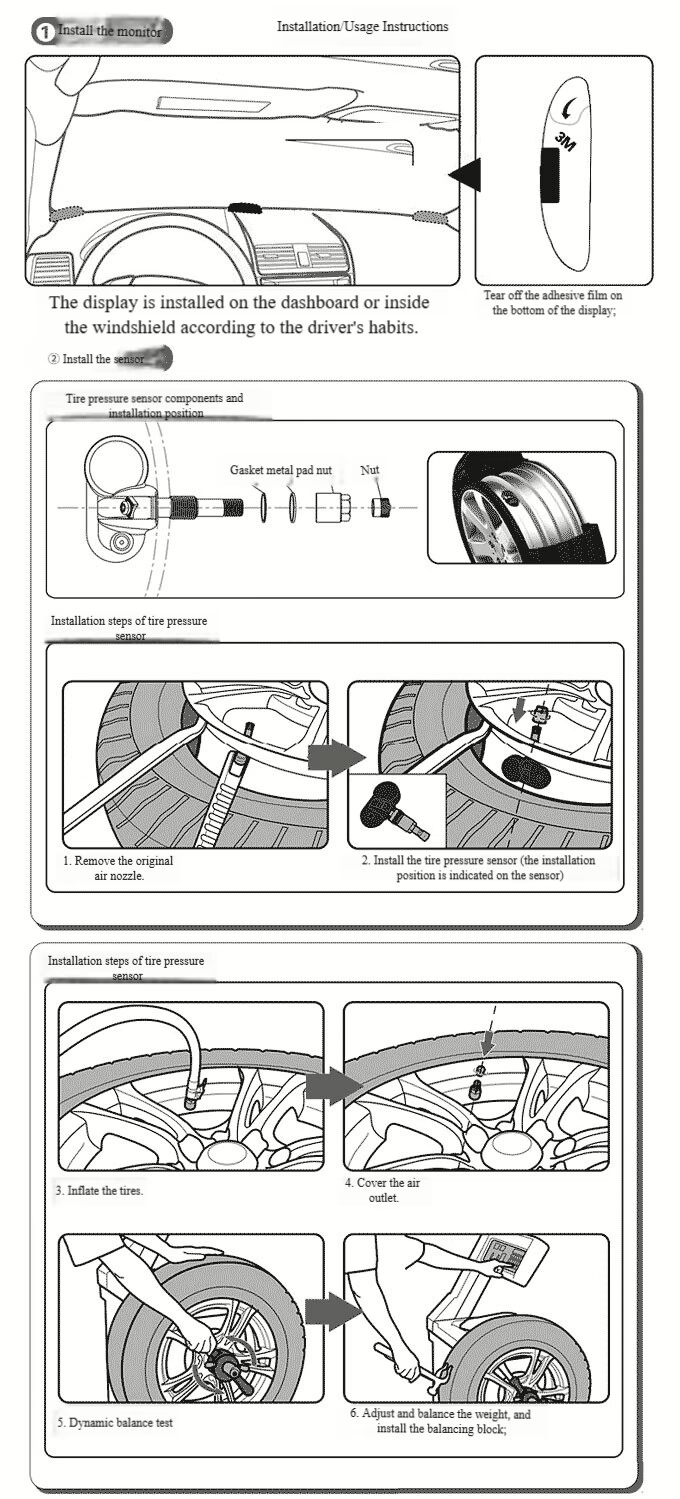
Illustrated Tire Pressure Sensor Installation Steps
Detailed Explanation of Tire Pressure Sensor Self-Learning Principle and Operation
- Press the “MENU” button on the turn signal stalk, select “Tire Pressure Display” from the “Mileage & Fuel Information Menu,” and then press the Set/Clr button;
- The Driver Information Center will display “Tire Pressure Relearning,” select “Yes,” and press the Set/Clr button. The horn will sound twice;
- The Driver Information Center will display “Tire Pressure Learning Enabled”;
- At this time, the left front turn signal indicator will remain illuminated. Increase (or decrease) the left front tire pressure until it reaches 8.3 kPa. After the horn sounds, you can stop pressurizing (or depressurizing). 5. Next, the right front turn indicator light will stay on, followed by the right rear and left rear turn indicators. Repeat the pressure adjustment process for the remaining three tires.
- After all four tires have been adjusted, the turn indicator light will stay on for 3 seconds, and the horn will sound twice, indicating that tire pressure learning is complete.
Use the air pump to adjust the tire pressure to the required value (generally, for turbocharged and flagship models, the tire pressure for 18-inch wheels and 245-width tires is 240, and for other 17-inch wheels and 225-width tires, the tire pressure is 220). The tire pressure displayed at the information center is the actual tire pressure. If you are unsure, you can use a tire pressure gauge to check it. If the error is not too large, you are done.
Situations where tire pressure sensors need to self-learn:
After a tire pressure monitoring system malfunctions, tire rotation, replacement of the body control module, or replacement of the tire pressure monitoring sensor, tire pressure relearning is required.
The principle of tire pressure sensor self-learning is quite simple.
Each of the four tires has a transmitter (the tire pressure monitoring wireless transmitter is attached to the rim inside the tire), and the central control computer is connected to a receiver. When tire pressure learning is activated, the computer program starts a “read-in mode,” and it does so sequentially. That is, the module corresponding to the left front tire first unlocks its write protection and prepares to match the transmitter. However, since all four tires are transmitting signals, the computer doesn’t understand which one is the left front tire. Therefore, a manual adjustment of the left front tire’s pressure is required. The computer uses this change to determine which transmitter’s data has changed. The computer then labels that transmitter as “left front,” and the left front tire reading on the display screen will use the data from that transmitter. This is why tire pressure learning must be done in a specific order.