
Cigarette Lighter TPMS with 4 Sensors: Installation and Positioning
Yes, the four sensors in a typical TPMS kit powered by a cigarette lighter are designed to correspond to the four specific tire positions of the vehicle.: Left Front (LF), Right Front (RF), Left Rear (LR), and Right Rear (RR). They cannot be installed randomly. Each sensor must be paired or “learned” to a specific corner of the vehicle on the display unit. If installed randomly without proper pairing, the pressure readings on the display will be assigned to incorrect tire positions, rendering the safety warnings useless.
The four sensors in a typical cigarette lighter-powered TPMS kit are designed for the four specific tire positions of the vehicle and cannot be installed randomly. Below is a recommended car TPMS cigarette lighter tire pressure monitoring system that supports four tires and allows the tire positions to be interchangeable.
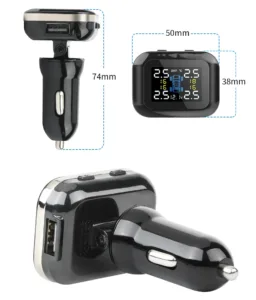
How a 4-Sensor TPMS System Identifies Tire Position
Each TPMS sensor has a unique electronic ID. The display unit (the cigarette lighter module) does not inherently know which sensor is on which wheel. A process is required to teach the display which sensor ID belongs to which corner of the car. There are two primary methods for this, depending on the system’s sophistication.
| System Type | Position Identification Method | Common in Cigarette Lighter TPMS? |
|---|---|---|
| Manual Pairing / Static Relearn | The user or installer must manually assign each sensor to a position. This is often done by using a trigger tool on each sensor in a specific order (e.g., LF, RF, RR, LR) or by temporarily changing the pressure in one tire at a time so the display can identify it. | Yes, this is the most common method for aftermarket, cigarette lighter-powered TPMS kits. |
| Automatic Location Learning (Auto-Location) | The system uses the vehicle’s ABS wheel speed sensors and/or accelerometers within the TPMS sensors themselves to automatically determine each sensor’s position after driving for a short period (typically 10-20 minutes above 15-20 mph). | Rare. This is a feature of more advanced, often factory-installed (OEM) systems. Most basic aftermarket kits do not have this capability. |
Standard Installation & Pairing Procedure for a Cigarette Lighter TPMS
For a typical aftermarket 4-sensor TPMS kit with a cigarette lighter display, follow this general procedure to ensure correct positioning:
- Physical Installation: Install each sensor onto the valve stem of each tire. It is crucial to label them immediately (e.g., with tape marked LF, RF, LR, RR) as you install them. This prevents confusion later.
- Power On the Display: Plug the display unit into the vehicle’s 12V cigarette lighter socket and turn on the ignition (or start the engine) to power the display.
- Initiate Pairing Mode: Consult your specific TPMS kit’s manual. Typically, you enter a “pairing,” “learning,” or “reset” mode by holding a button on the display for several seconds until an indicator flashes.
- Teach Sensor Positions: The most common method involves activating each sensor in a set sequence. The sequence is almost always:
- Left Front (Driver’s side front in left-hand drive countries)
- Right Front (Passenger side front)
- Right Rear (Passenger side rear)
- Left Rear (Driver’s side rear)
You activate the sensor by either:
- Using a small magnet or an activation tool (provided with some kits) near the sensor.
- Letting air out of the tire for 2-3 seconds. The rapid pressure change causes the sensor to transmit a signal, which the display then assigns to the current position in the sequence.
- Confirmation & Completion: After the fourth sensor is activated, the display should beep or show a confirmation message. The pairing is complete. Drive the vehicle for a few minutes to ensure all readings are stable and correctly displayed.
What Happens If You Install Sensors Randomly?
If you install the four sensors without following the pairing procedure, one of two things will occur:
- Display Shows Incorrect Positions: The display will show pressure readings, but the “Left Front” reading on the screen might actually be from the right rear tire. This defeats the purpose of the system, as a low-pressure warning for “Left Front” would send you to check the wrong tire.
- Display Fails to Show Any Readings: Some systems will not display data until all four sensor positions have been successfully learned. The screen may show dashes (–) or error symbols.
What to Do After Tire Rotation?
If you rotate your tires (e.g., moving the front tires to the rear), the sensors physically move with the wheels. You have two options:
- Re-pair the Sensors: Perform the pairing procedure again after the rotation. This is the most accurate method.
- Use Display Software to Swap Positions (if supported): Some advanced displays have a menu option to manually swap the displayed positions (e.g., tell the display that the sensor now in the left rear position is the one that was previously in the left front). Check your user manual.
Conclusion and Best Practices
For a cigarette lighter TPMS system with four sensors, you must install and pair each sensor to its correct wheel position. This is not optional for accurate monitoring. Always refer to the user manual for your specific kit, as the pairing sequence and method can vary. The key steps are: label sensors during installation, follow the exact pairing sequence (usually LF→RF→RR→LR), and verify the readings on the display match the actual tire pressures using a reliable tire pressure gauge.